Productivity Software Add-in's For Microsoft Outlook
Search:   
  Home  |   Products  |   Purchase  |   Support  |   Partners  |   Contact Us  |

Outlook Add-ins
Auto-Mate
   Features
   Screenshots
   Download
   FAQ
DirectXchange
Traylook
 
Exchange
Remote Out-of-Office


Auto-Mate Add-in for Microsoft® Outlook®


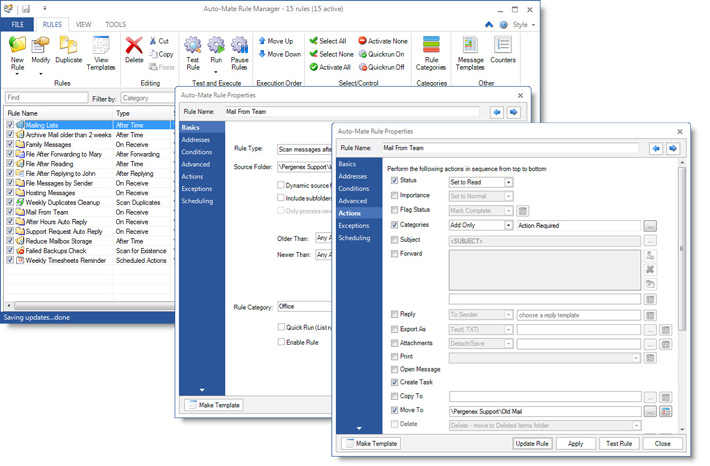
Auto-Mate Rules! See screen shots.There's nothing more frustrating than rummaging through a cluttered Inbox full of email messages when you’re looking for specific information. It's easy to let messages pile up in your Inbox and eventually it becomes unmanageable because you don't want to go through each message individually and make a decision on whether to delete it or to leave it alone. Works with Vista

One of the best things to do to reduce Inbox clutter is after reading a message, either delete it or move it. Leave it in your Inbox only if it needs action. It is also recommended that users create subfolders to file messages by topic or user. This seems like an easy process to follow, but it often becomes a very difficult thing to keep up with.

Pergenex Software comes to the rescue by Auto-Mating your folders! Auto-Mate Add-in for Microsoft® Outlook® can automatically file and delete your mail for you. Sure, you can use Outlook's Rules Wizard to define custom rules for processing messages when they arrive, but sometimes you just need to review these messages in your Inbox before they get filed.

Imagine starting Outlook® with an empty Inbox every morning! Auto-Mate is your personal assistant to help you get and stay organized and be productive.

Auto-Mate is available in two versions...Standard and Pro. Compare the features here.
Download full version now!  Purchase License now!

 Download Product Sheet (900K)

Key Benefits

Click to Download 30 day Free Trial

  • Auto-Mate Rules run at periodic intervals during the day. Set actions to occur after messages are older than 15 minutes, hours, days, weeks or even months. You can also choose to act on them immediately as they are received or sent.
  • Auto-Mate can file your mail for you automatically while you focus on more important tasks.
  • Spend less time managing email messages. Auto-Mate will help you get organized quickly.
  • Auto-Mate can clean up after yourself and automatically delete email, it's like having a personal assistant.
  • Start Outlook® with a clean inbox and organized folder system every morning.
  • No complex programming, a basic set of rules and folders can be created automatically, then you can build rules at your own pace.
  • Auto-Mate rules do not interfere with standard Outlook® rules in any way. In fact they can work in conjunction with them!
  • Overcome the 32K server-based rule limit in Microsoft Exchange®.
  • Simple to install, integrated with Outlook®, and will not change your messages in any way.
  • Works with Outlook versions: 2000, 2002, 2003, and 2007.

What Can Auto-Mate's Rules Do For You?

  • Delete email after it has been read.
  • File email after it has been read.
  • File email after it has been sent.
  • File email messages after you reply to or forward them.
  • File email messages that have been marked for follow-up.
  • Organize your messages by day, week, month and year.
  • Organize your messages by company or client name.
  • Archive messages based on age.
  • Replace or extend your Exchange server rules when you exceed the 32K size limit.
  • Delete messages that contain large attachments. (pro)
  • Automatically mark messages with colored flags. (pro)
  • Automatically assign messages to categories. (pro)
  • Change the importance level of messages. (pro)
  • Remove attachments from messages to reduce storage space. (pro)
  • Export email messages to a network folder, then delete the messages. (pro)
  • Reply automatically to messages that have been in your inbox for a certain period of time. (pro)
  • Automatically forward messages to a handheld device such as a Blackberry® or TreoTM. (pro)
  • Automatically print messages. (pro)
  • Much much more, the possibilities are endless...

Awards and Press

Microsoft Office Marketplace logo Auto-Mate featured in the Microsoft Office Marketplace.
About.com Auto-Mate Pro reviewed on About.com.
C/NET Reviews Auto-Mate in C/NET Article, How to Improve Your Outlook by Rafe Needleman, Editor Business Buying Advice.
Slipstick Systems Auto-Mate in Exchange Messaging Outlook Article, Taming your Inbox on Slipstick.com.
Outlook Power Magazine Auto-Mate in Outlook Power Article, The Deleted Items folder is not a filing cabinet by Diane Poremsky.
Downloadsquad.com article Download Squad article on solving the Outlook 32K rule limit with Auto-Mate.
Downloadsquad.com article SearchExchange article on Auto-Mate.
Tucows 5 cow rating! Auto-Mate receives Tucows highest rating.
5 star rating Auto-Mate receives the higest rating on SofoTex Software Downloads.
Rated 5 stars at download3000.com Auto-Mate receives the higest rating on Download3000.com.
 5cup by www.5cup.com Auto-Mate receives the highest rating on 5cup.com downloads.


Copyright 2003-2007, Pergenex Software LLC All Rights Reserved
Microsoft and the Office logo are trademarks or registered trademarks of Microsoft Corporation in the United States and/or other countries.